SaveKit Input Remap + Profiles
SaveKit Input Remap + Profiles is a GDScript add-on for Godot 4 that manages named input profiles (physical keyboard keys, mouse buttons, joypad buttons and signed joypad axes) and applies them to the engine's InputMap. It adds presets, share codes, exact-binding conflict warnings and plain-text binding hints such as Pad A or Esc. The hints are text, not controller icons. The SaveKit adapter is optional.
What is in it
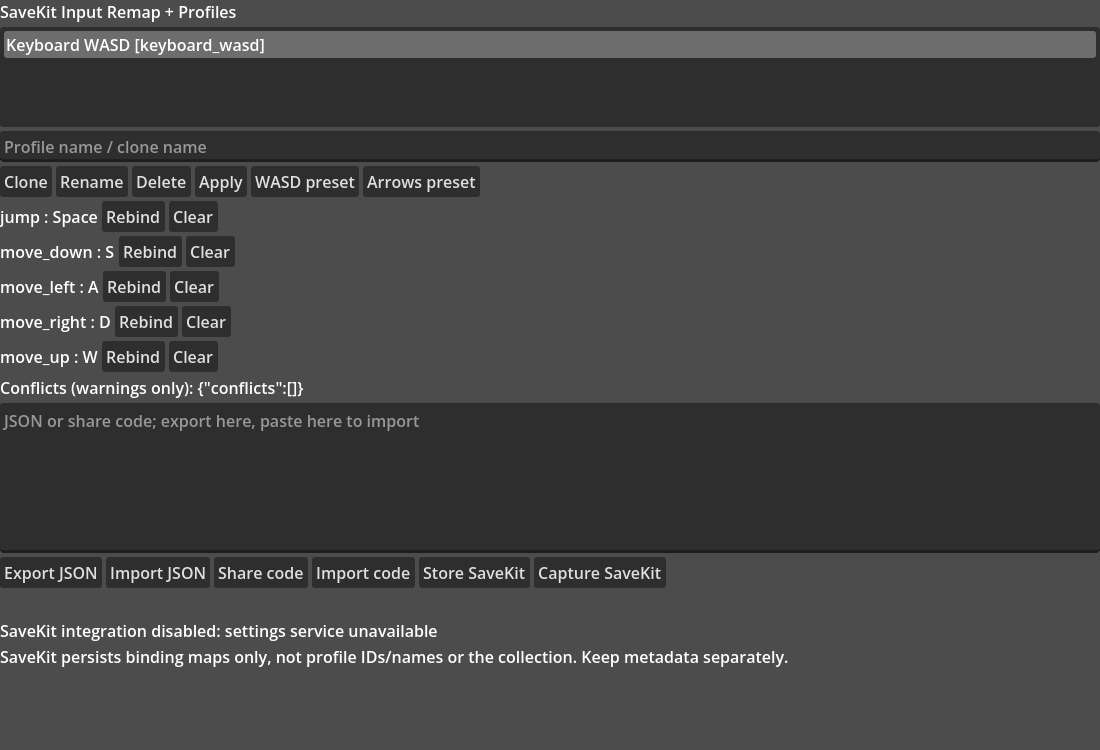
- Multiple profiles. Add, clone, rename, delete, select and apply named profiles. Apply replaces only the actions a profile lists, sets their deadzones, and leaves other InputMap actions alone.
- JSON import and export. Validated, versioned documents (schema version 2). Version-1 documents are migrated to version 2. A failed import does not change your existing profiles.
- Three presets. Keyboard WASD, keyboard arrows and a basic gamepad preset, as JSON files in
examples/presets/. - Share codes. A profile becomes a text string starting with
SKIP1-that you can paste back in. A checksum catches accidental corruption. Share codes are not encrypted and not authenticated: anyone can read or make one. - Conflict warnings. Reports when two actions in a profile share exactly the same binding (same key and modifiers, same device, same axis direction). Warnings do not block applying a profile. The free Lite edition finds the same exact-binding conflicts; the paid edition has no more detailed conflict report than Lite.
- Text hints. Labels such as
Space,Esc,Mouse Left,Pad AandPad Axis 0+. A keycode that is not valid is labelledKey N. - Panel scene and demo. A ready-made panel (profile list, clone, rename, delete, apply, two preset buttons, per-action Rebind and Clear, JSON and share-code text box) and a small demo project. Rebind and Clear keep the action's deadzone, a rejected rebind shows
Rebind failed: ..., and Esc cancels capture. - Optional SaveKit adapter. Works with a settings object that you pass in, if it provides
get_settings(),set_action_events()andsave_settings(). It saves the binding map only, not profile IDs or names. Without that object the adapter reports itself disabled and everything else keeps working.
Install
- The ZIP has no enclosing folder. Extract it into a new, empty folder.
- To run the demo, open
demo/project.godotin Godot, or rungodot --headless --path demo --quit-after 3from the extracted folder. Keep the extracted layout: the demo reaches the add-on and the presets throughres://../paths. - For your own game, copy
addons/savekit_input_profilesinto your project'sres://addons. No autoload and no plugin activation is needed. Preload the scripts as shown indocs/quickstart.md. The demo's outside-the-project paths are for running the demo from the ZIP; they are not an export recipe. - To use the preset buttons of the panel, set
panel.preset_dir(for exampleres://presets, a folder holding the preset files) before the panel enters the scene tree. If it is empty the preset buttons show an error.
Testing scope
Written for Godot 4; recorded release testing used Godot 4.7.2 on macOS, headless. Included test scripts are in tests/.
What was not tested
- GUI editor interaction or using a GUI window by hand; headless editor import/load was tested.
- Real keyboard, mouse or controller input. The Rebind row's own key-capture needs real input and has no automated test; the handler that receives its result is tested.
- The real GodotSaveKit service. The SaveKit adapter was tested against a stub only.
- Other Godot versions, other operating systems, exported games.
Please check controllers and exports on your own setup before you rely on them.
Good to know
- Conflict detection is exact-match only. Overlap between wildcard devices is not analysed.
- Only physical keyboard keys are supported. Action names in imported documents must be Strings; a StringName key is rejected.
- Imports are size-limited: JSON up to 65,536 bytes, share codes up to 100,000 characters.
- The add-on declares eight global class names (for example
InputProfileServiceandGlyphHintMap). They could clash with scripts in your project. - With the SaveKit adapter, SaveKit keeps the binding map only. Keep profile IDs, names and the profile collection yourself, for example as exported JSON.
Licence
Copyright (c) 2026 Fortress MSSP LLC.
This is a single-developer commercial licence for the 13 paid-only files enumerated in LICENSE.txt Part A. The shared core and all other files are MIT (Part B). All files in the free Lite edition are MIT. Each developer who uses the paid-only files needs a licence. Supplied as-is, without warranty. Full text: LICENSE.txt in the download.
AI disclosure
Code and documentation were written with AI assistance (see AI-DISCLOSURE.txt in the download). AI assistance does not replace review in your own project or testing on your devices.
Related
- Free edition: Input Profiles Lite (one profile, MIT licence): https://mustafa-sec.itch.io/savekit-input-remap-profiles-lite
- GodotSaveKit is a separate add-on for save slots and settings. This add-on does not replace it and does not require it: https://mustafa-sec.itch.io/godotsavekit-godot-4-save-slots-settings
Purchase
In order to download this asset pack you must purchase it at or above the minimum price of $5.99 USD. You will get access to the following files:
Development log
Leave a comment
Log in with itch.io to leave a comment.